iWidgets : iOS Widgets
JustNewDesignsPersonalization
4.724.00 Reviews
- Version
- 1.0.005
- Installs
- 10.00K
- Age Rating
- Everyone
Screenshots
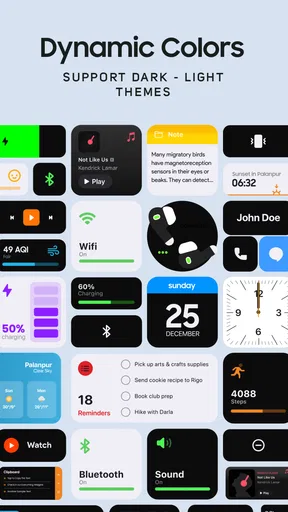
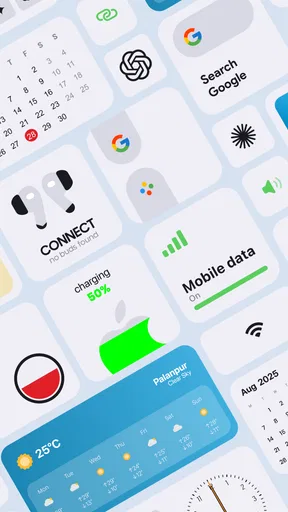
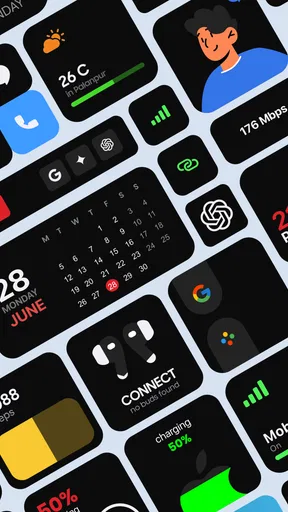
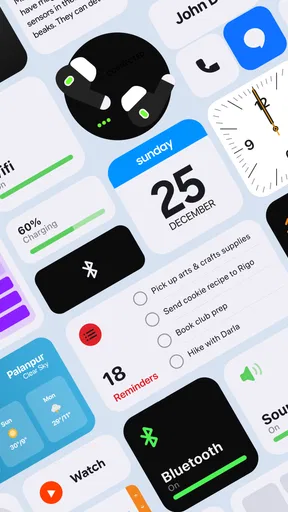
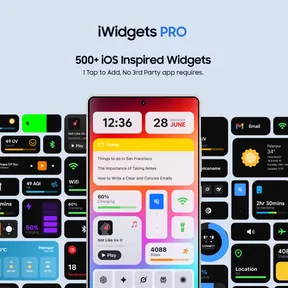
Our Review of iWidgets : iOS Widgets
 Analysis by Appyee
I see iWidgets as a home-screen styling tool with a practical purpose: it can make useful details easier to spot while giving an iPhone a look that feels less like the default setup. That balance is the appeal, but it also sets the right expectation. This is most worthwhile if you enjoy arranging your screen and will actually use the information its widgets surface; it is less compelling if you want a hands-off phone with no interest in visual tweaks.
A collection that invites deliberate choices
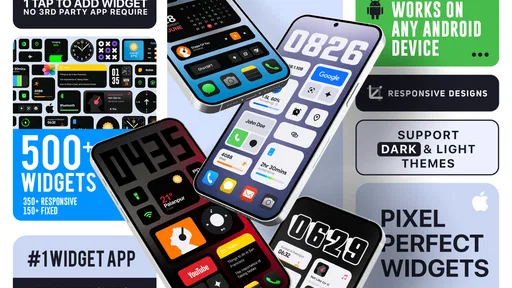
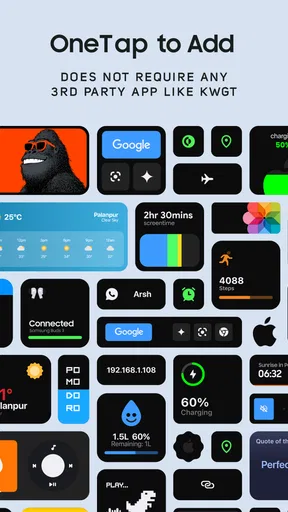
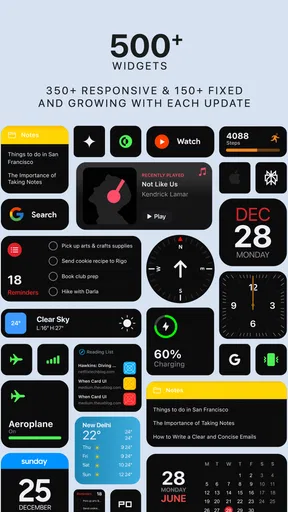
Made by JustNewDesigns, this personalization app is a paid download, listed at $0.40, and its catalog is described as having more than 500 widgets with a one-tap add option. That breadth is useful, but I would treat it as a menu to browse rather than a reason to fill every available space. A few well-chosen widgets can make a screen easier to scan; too many compete for attention and leave less room for the apps you open most.
When I set up a screen, I’d start by deciding what I want to see without opening an app: perhaps the time, a date, or a piece of information I check routinely. Then I’d choose a visual style that fits the wallpaper and test the layout in daily use. This order matters. Picking a striking design first can lead to a pretty screen that is harder to read, while choosing a task first helps the decoration serve a purpose.
Where it differs from built-in options
The built-in widget choices are the natural starting point for anyone who only needs a simple glance at familiar information. A dedicated collection such as this is more appealing when you want more visual variety and enjoy matching the home screen to your own taste. It is not automatically better for every user: if the standard options already give you the right information in a layout you like, a separate personalization app may add little to your routine.
The practical trade-off is attention. Adding a widget takes little effort, but choosing, arranging, and living with several styles can become its own hobby. I’d keep a first pass restrained, use the phone normally for a few days, and only add another element if I can name what it helps me notice. That small test prevents the screen from becoming a display that looks polished but makes everyday navigation less clear.
Who is likely to enjoy it
The app suits people who like a personal home screen, enjoy trying different visual arrangements, and want useful details close at hand. It may also be a good fit if a small change helps make a familiar device feel fresh. Someone who rarely looks at widgets, prefers the default appearance, or wants to avoid spending time on layout decisions may be happier sticking with built-in choices.
It is rated for Everyone, has a 4.7 average from around 900 ratings, and has passed 10,000 installs. Those figures suggest that the idea has found an audience, though they cannot tell me whether a particular design will suit your screen or habits. The app is currently at version 1.0.005, was released on December 29, 2025, and requires iOS 12 or later, so checking your device’s software compatibility before paying is a sensible first step.
Ever felt like your iPhone's home screen needed a bit of a shake-up? I totally get it. We get so used to the same old layout that even a small change can feel refreshing. Enter iWidgets: a nifty little app that promises to give your home screen a fresh, personalized look. Let’s dive into what makes this app tick and why it might just be the change you’re looking for.
Getting Started with iWidgets
So, you’ve downloaded iWidgets and are ready to give it a whirl. The setup process is pretty straightforward. As soon as you open the app, you're greeted with a slick interface that’s easy to navigate. If you’re anything like me, you’ll appreciate the simplicity. No need to wade through complicated menus or endless options. It’s all right there, ready for you to explore.
The app offers a variety of widgets ranging from weather updates to calendar events. You can even customize them with different themes and colors to match your mood or the season. The customization options are a real game-changer, letting you truly make your home screen your own. I mean, who doesn’t want a bit of personal flair?
Customization at Its Best
One of the standout features of iWidgets is its ability to let you customize widgets down to the tiniest detail. Want a minimalist clock widget on your home screen? Done. Need a bold weather widget with a splash of color? Easy peasy. The app gives you the freedom to tweak everything from font styles to background images.
What’s cool is that you can mix and match different styles to keep things interesting. I found myself constantly experimenting with new combinations, and trust me, it’s addictive. The app also updates regularly, bringing new themes and styles into the mix, so you’re never stuck with the same old look.
How Does It Fit Into Your Daily Routine?
Now, what about practicality? It's not just about looking good; it’s about being functional too, right? The widgets are not just eye candy. They provide real-time information that can be incredibly handy. Whether it's checking the weather before you head out or glancing at your calendar to see your next appointment, it’s all there at a glance.
Using iWidgets has genuinely streamlined my daily routine. I used to have a dozen apps open to get the same info now accessible from my home screen. It’s like having a personal assistant who’s always on standby. Plus, the battery usage is pretty efficient, so you don’t have to worry about your phone dying halfway through the day.
Final Thoughts
So, is iWidgets worth a download? I’d say absolutely. It’s a fun, practical way to breathe new life into your iPhone’s home screen. Whether you’re a fan of sleek, minimalist design or love a splash of color and creativity, this app has something for everyone. And the best part? It’s super easy to use, so you can start customizing right away without any hassle.
In a world where we spend so much time on our phones, it makes sense to have a home screen that’s not just functional but also feels like your own personal space. iWidgets lets you do just that, and I’d recommend giving it a try. Who knows? You might just find yourself having a little more fun with your phone every day.
A realistic way to put the widgets to work
Picture a weekday morning when you are deciding whether to take a jacket and checking what comes next on your schedule. A weather widget and a calendar view can make those checks quicker without turning the home screen into a row of decorative panels. The useful question is not how many designs you can add, but which glance saves you a trip into another app. I would place the most time-sensitive information where it is immediately visible and leave less urgent details for a second screen.
There is also a useful distinction between a widget that informs and one that mainly sets a mood. A clock or weather display may earn its space through repeated checks, while a more elaborate design can be worth keeping simply because it makes the phone pleasant to pick up. I would give each a different job rather than expecting every tile to improve productivity. That makes it easier to decide what stays when the screen starts to feel crowded.
Small setup decisions that make a difference
Before settling on a layout, I’d compare the widget against the wallpaper under ordinary conditions, not just while browsing designs. Check whether text remains easy to read, whether the color contrast holds up, and whether the most useful detail is visible at a glance. A background image or decorative treatment can look appealing in isolation yet make the information harder to scan once it sits behind the rest of the screen.
I’d also make one change at a time. Add a single widget, use the phone as usual, and notice whether you actually look at it or whether your hand still goes straight to the relevant app. That simple trial separates genuine convenience from novelty. If the information is not helping, remove or replace it rather than adding more widgets in the hope that a busier layout will somehow become more useful.
Another practical trade-off is consistency. Mixing styles can be fun, but several unrelated fonts, colors, and image treatments may make the screen feel untidy. I’d choose one visual direction for the main screen and reserve experiments for another page. That keeps the frequently used area readable while still leaving room to explore the catalog without having every new idea compete for attention.
What to expect before choosing it
The short description calls the app iWidgets, while its full name is often shown as iWidgets: iOS Widgets. Either way, the decision is about whether a dedicated selection of designs is worth the small upfront cost for you. The price is modest, but the real value depends on how much you care about home-screen appearance and whether you find a widget that earns a regular place there. If all you want is a basic date or clock, the options already on your device may be enough.
Compatibility is another practical point: the listed minimum operating-system requirement is iOS 12. If your device meets that requirement, you can consider the app; if not, it is not the right purchase for that device. The Everyone age rating also makes it broadly suitable from a content perspective, though the choice of design remains personal and depends on what you find readable and attractive.
I would not choose it on the assumption that a large catalog means every style will be a match, or that adding widgets automatically makes a phone more efficient. Its strongest case is for someone who enjoys visual customization and is willing to edit the layout with a little intention. For a user who values a fixed, uncluttered screen above all else, the built-in approach is simpler and may be the better fit.
My verdict after weighing the trade-offs
My recommendation is positive, but it is aimed at a particular kind of iPhone owner: someone who likes to personalize a screen and can name the information they want to see there. The broad choice of widget designs gives that person room to try different looks, while weather and calendar examples show how style can sit alongside everyday utility. I would begin with one or two useful additions, keep the layout legible, and judge the result by whether it helps during normal use rather than by how impressive it looks in a screenshot.
For anyone who prefers not to adjust their setup, or who already finds the built-in widgets adequate, there is no need to add another tool just for the sake of novelty. But if your home screen feels stale and you enjoy making small, visible changes, this is an approachable way to experiment. I’d treat it as a customization purchase first and a convenience aid second: that is the most realistic way to enjoy what it offers without expecting it to transform how the phone works.
Verdict
Strengths of iWidgets : iOS Widgets
- Highly customizable widgets enhance user experience.
- Intuitive interface for easy navigation.
- Seamless integration with existing apps.
- Regular updates with new features.
- Minimal impact on device performance.
Limitations of iWidgets : iOS Widgets
- Limited free features; subscription required.
- Occasional glitches in widget display.
- Some widgets lack deep customization.
- Requires iOS 14 or later for full functionality.
- May drain battery faster over time.
Other Releases by JustNewDesigns
View All
Depth Wallpapers & Live Clock
Personalization4.5

LineX Icon Pack
Personalization4.5

Everything Widgets
Personalization4.6

LineX White Icon Pack
Personalization4.5
Similar Picks in This Category
View All
Microsoft SwiftKey AI Keyboard
SwiftKey4.3

Wallpapers
Google LLC4.1

Zedge™ Wallpapers & Ringtones
Zedge4.7

Yandex Browser with Alice AI
Direct Cursus Computer Systems Trading LLC4.3

Ringtone Maker:create ringtone
Big Bang Inc.4.7

Fonts Keyboard
Fonts Keyboard3.9
Frequently Asked Questions
What is iWidgets and how does it enhance my iOS experience?
iWidgets is an application designed to enhance your iOS experience by offering customizable widgets for your home screen. It provides a variety of widget styles and sizes, allowing you to personalize your device according to your preferences. With iWidgets, you can access important information at a glance, such as weather updates, calendar events, and more.
Are there any costs associated with using iWidgets?
iWidgets is available as a free download on the App Store, offering a range of basic widgets at no cost. However, the app also includes premium features and advanced customization options that can be unlocked through in-app purchases. This allows users to access a wider selection of widgets and additional functionality.
How user-friendly is iWidgets for someone who is not tech-savvy?
iWidgets is designed with user-friendliness in mind, featuring an intuitive interface that makes it easy for anyone to customize their home screen. The app includes step-by-step guides and tutorials to help users create and personalize widgets. Even those who are not tech-savvy will find it simple to navigate and use effectively.
Does iWidgets affect the performance or battery life of my iOS device?
iWidgets is optimized to run efficiently on iOS devices, minimizing its impact on performance and battery life. While running multiple widgets simultaneously may slightly increase power consumption, the app's design ensures that it remains lightweight and responsive. Users can enjoy personalized widgets without significant drain on resources.
What customization options are available in iWidgets?
iWidgets offers extensive customization options, allowing users to personalize their home screen with various widget styles, colors, and sizes. You can choose from an array of themes and designs to match your aesthetic preferences. Additionally, iWidgets supports third-party integrations, enabling you to display data from other apps directly on your widgets.
